Agent awareness
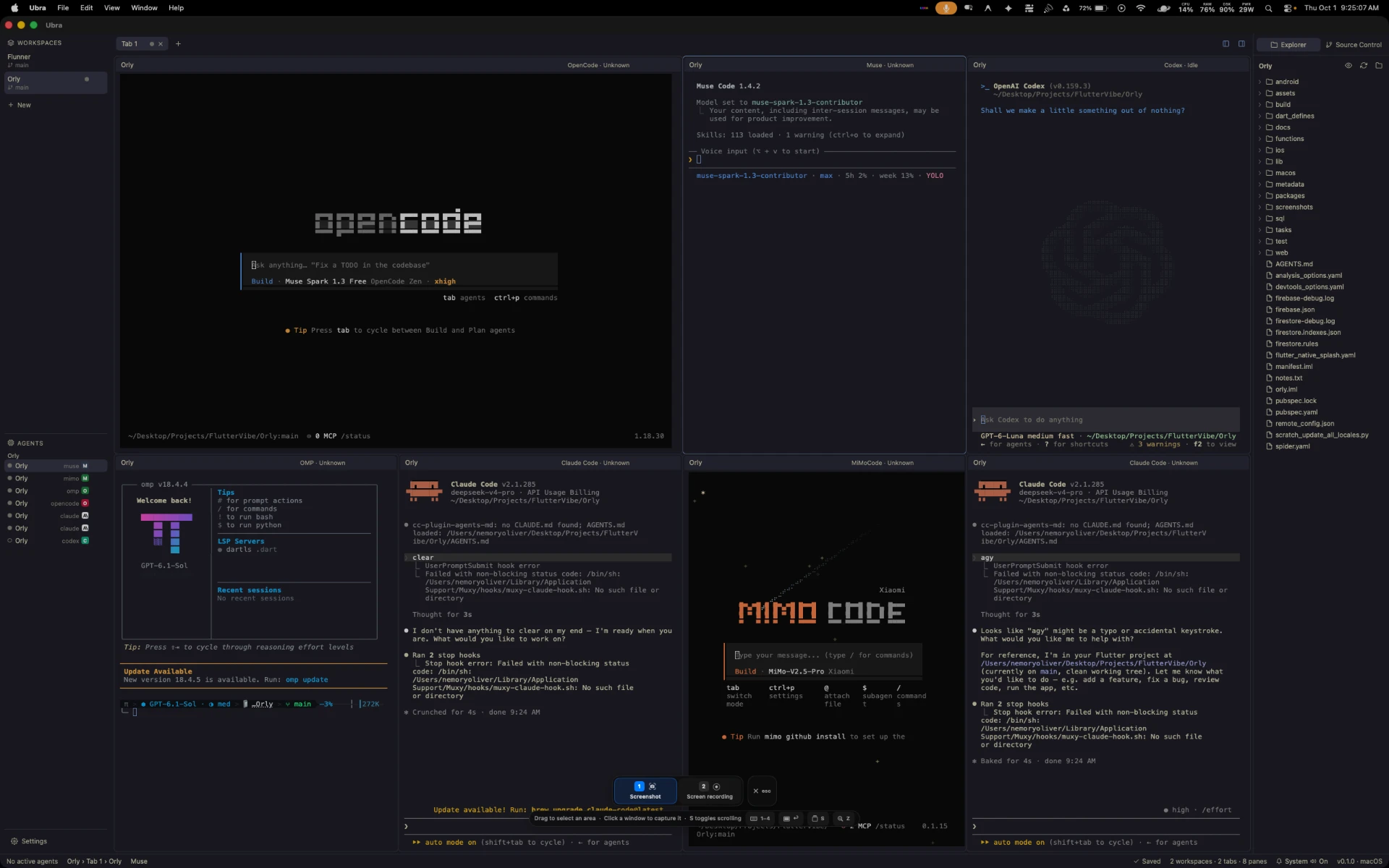
Every pane shows the state of the coding agent running inside it, as a badge you can read at a glance across the whole window.
Ubra is a free, open-source terminal multiplexer for coding agents. Instead of running claude, codex and opencode in separate terminals, run them in one desktop app — workspaces, tabs and panes with agent state badges, persistent layouts, tray mode and plan usage.
Running each coding agent in its own terminal window works until you have three or more. Then you lose track of which one is waiting, and your setup disappears on reboot. Ubra keeps every agent in one window, shows each one's state as a badge, and restores the whole layout when you reopen it.
| Task | Separate terminals | Ubra |
|---|---|---|
| See which agent needs you | Switch to each window | Per-pane state badges |
| Organise by project | Manual window juggling | Workspaces → tabs → panes |
| Survive a restart | Rebuild by hand | Layout persistence |
| Keep agents running when closed | Window must stay open | System tray |
| Track plan usage | Separate browser dashboard | Codex & Claude usage windows |
GitHub stars

Platforms
macOS · Linux · Windows
License
MIT · free forever
What Ubra does
Every pane shows the state of the coding agent running inside it, as a badge you can read at a glance across the whole window.
Workspaces hold tabs, tabs hold terminal panes. Each pane runs a real agent CLI — claude, codex, opencode and friends — on xterm.js.
Your workspaces, tabs and pane arrangement persist, so reopening Ubra puts you back exactly where you left off.
Ubra keeps running in the system tray while agents work, so long-running sessions survive closing the window.
A built-in sidebar for browsing the workspace file tree and reviewing source control state next to the agents editing it.
Dedicated usage windows for Codex and Claude plans, so you can see where you stand without leaving the app.
Built with Tauri v2 (Rust) · Svelte 5 · xterm.js
The app
Workspaces on the left, tabs across the top, agent panes in the grid, and Explorer plus Source Control on the right.
Alternatives
A native desktop GUI, MIT licensed and free. See an honest side-by-side of where each tool is stronger.
Sponsors
$5 / month
$25 / month
$100 / month
Download a bundle for macOS, Linux, Windows, or build it from source. No account, no telemetry by default.